


Your data, always accessible
- Your blended and transformed data is stored securely in Coupler.io's built-in storage.
- You maintain full control and can use your datasets anytime for reporting, analysis, or connecting to BI tools.
Combine data from 400+ sources and turn it into structured data sets with visual tools, SQL, or AI. Everything is stored inside Coupler.io without external databases or separate tools.
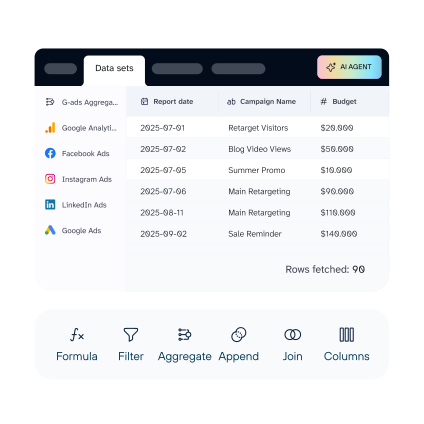
Coupler.io blends and transforms your data into clean reports, secure backups, and AI-ready data sets. You control how the data is organized for reporting and AI analytics.


 Formula
 Filter
 Aggregate
 Append
 Join
Join
 Organize


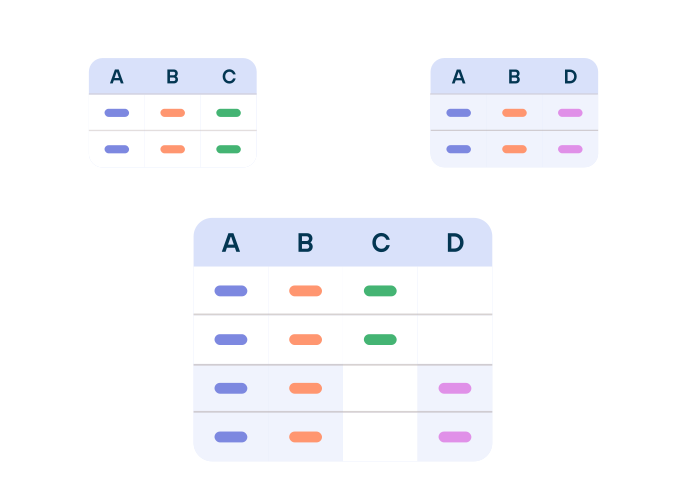
Stack data sources vertically into one continuous table. Coupler.io automatically aligns identical columns so you can compare metrics across sources.
Common use cases:
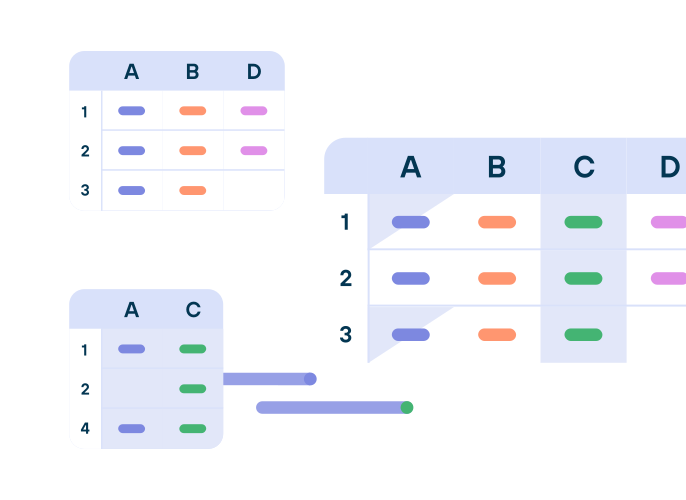
Add context from related systems to your primary data set. Merge two or more data sources based on matching values like customer ID, order number, etc.
Common use cases:
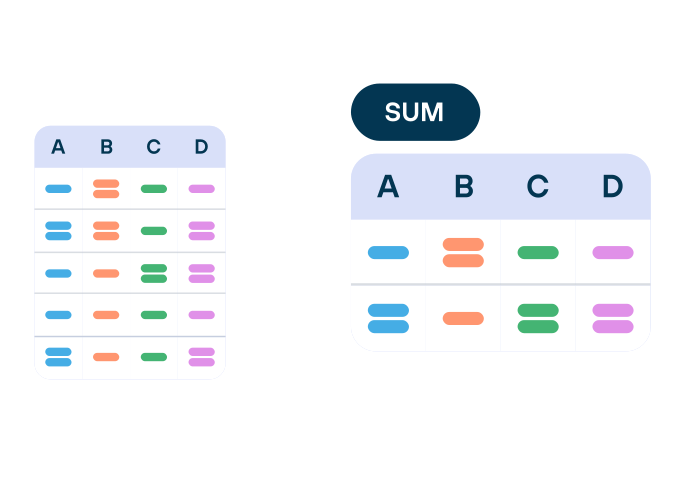
Group your data by one or more columns to transform granular records into clear overviews. Calculate totals, averages, counts, or other summary statistics.
Common use cases:
Use SQL when your data preparation needs more control than a visual transformation gives you.
Write one query to combine, reshape, rank, and compare your data sets, using DuckDB SQL syntax.
Go beyond a single Append, Join, or Aggregate. Use every join type, combine datasets with UNION and INTERSECT, calculate running totals and rankings, or pivot rows into columns – all in one query.
Describe the report or transformation you need. Coupler AI reads your source schemas, writes the SQL, and saves it as a reusable data set. The query stays visible, so you can review the logic before it runs, and edit anytime.

















Shape your data exactly how you need it for analysis and reporting.
Manage columns, filter rows, and create custom calculations - all without writing code.
Control which columns appear in your final report and how they're structured. Rename columns for clarity, reorder them for better readability, hide unnecessary fields, or create new calculated columns.
Apply filters to include only the data you need. Choose a column and set criteria - just like filtering in a spreadsheet. Available operators adapt to each column's data type for precise control.
Build custom calculations to create new columns based on your existing data. Use over 70 built-in functions for numeric, text, date, and logical operations. No coding required.

"We went from spending half our week preparing data to having report-ready insights in minutes. Coupler.io handles the blending and calculations we used to do manually in spreadsheets."


No. All transformations, such as data blending, filtering, and column management, are done through a visual interface. You set up everything with clicks and dropdowns. For custom calculations, you'll write formulas using Coupler.io's 70+ built-in functions, similar to how you'd create formulas in a spreadsheet.
Append stacks data vertically. Use it when your sources share the same structure, and you want to combine them into one table (e.g., ad performance from Facebook, Google, and LinkedIn).
Join merges data horizontally based on a matching column, like customer ID or order number. Use it to enrich one dataset with context from another (e.g., connecting Shopify orders with Google Ads campaign data).
Data set templates are pre-configured setups built by data analysts for common reporting scenarios in marketing, finance, sales, and ecommerce. Each template already includes the right source connections, transformations, and column selections. Instead of building a report from scratch, you start with a ready-made template and get analysis-ready data in minutes.
All blended and transformed data is stored securely in Coupler.io's built-in storage. You don't need external databases or spreadsheets. Your datasets remain accessible anytime for reporting, further analysis, or connecting to AI tools.
Once you configure sources, blending rules, and transformations in your data flow, Coupler.io runs it on a schedule automatically. Your reports stay up to date without manual intervention.




