
Export ActiveCampaign to Excel
Automate marketing data exports from ActiveCampaign to Excel with Coupler.io for in-depth CRM and campaign analysis. Apply Excel's analytical tools, pivot tables, and formula capabilities to uncover engagement patterns and sales pipeline trends across your marketing automation data.


What data you can export from ActiveCampaign
-
CampaignsEmail campaign records with subject lines, send dates, delivery statistics, and engagement metrics for building performance comparison tables and trend analysis in Excel's familiar spreadsheet environment.
-
ContactsDetailed contact profiles including email addresses, custom field values, engagement scores, and subscription status for database segmentation, scoring models, and audience profiling using Excel's filtering tools.
-
ListsSubscription list data with member counts, opt-in dates, and growth metrics for tracking audience development over time and analyzing list performance through Excel pivot tables and charts.
-
DealsSales pipeline records with deal names, stage positions, monetary values, and owner assignments for building weighted forecasts, pipeline velocity calculations, and win-rate analysis in Excel.
-
SegmentsDynamic segment definitions with membership criteria, contact counts, and behavioral conditions for reviewing targeting logic and mapping audience overlap using Excel's analytical capabilities.
-
FormsLead capture form data with submission counts, field configurations, and conversion metrics for measuring form effectiveness and optimizing lead generation workflows through spreadsheet analysis.
-
AutomationsWorkflow performance records with trigger types, completion rates, and step-by-step engagement data for mapping automation efficiency and identifying drop-off points using Excel's visualization features.
-
TagsContact tagging records with application frequency, category groupings, and behavioral indicators for analyzing classification patterns and refining contact organization through Excel's sorting and grouping tools.
All-in-one tool for ActiveCampaign data exports and analytics
Pull campaign metrics, contact records, and deal pipeline data from ActiveCampaign, then merge with advertising spend, website analytics, or revenue figures from other platforms to build unified Excel workbooks for cross-channel marketing analysis.

Convert ActiveCampaign records into Excel-friendly formats with structured columns, consistent data types, and pivot-table-ready layouts that let you immediately apply formulas, conditional formatting, and sorting for detailed marketing performance review.

Maintain accurate Excel reports with automated updates ranging from 15-minute to monthly intervals. Keep your campaign tracking sheets and pipeline models populated with the latest ActiveCampaign data without manual exports or copy-paste routines.

Go beyond spreadsheet analysis with Coupler.io AI integrations. Ask natural language questions about your ActiveCampaign data and receive AI-generated answers, trend explanations, and recommendations without writing formulas or building charts.

Why export ActiveCampaign to Excel - real life cases

Email campaign performance benchmarking

Sales pipeline forecasting and deal tracking

Contact database health and segmentation analysis

Form conversion tracking and lead source attribution
How to export ActiveCampaign to Excel
 30 seconds
30 seconds
10 seconds
30 seconds
30 seconds
30 seconds
10 seconds
Automate data exports with the no-code ActiveCampaign Excel integration
Connect similar CRM apps and get data in minutes


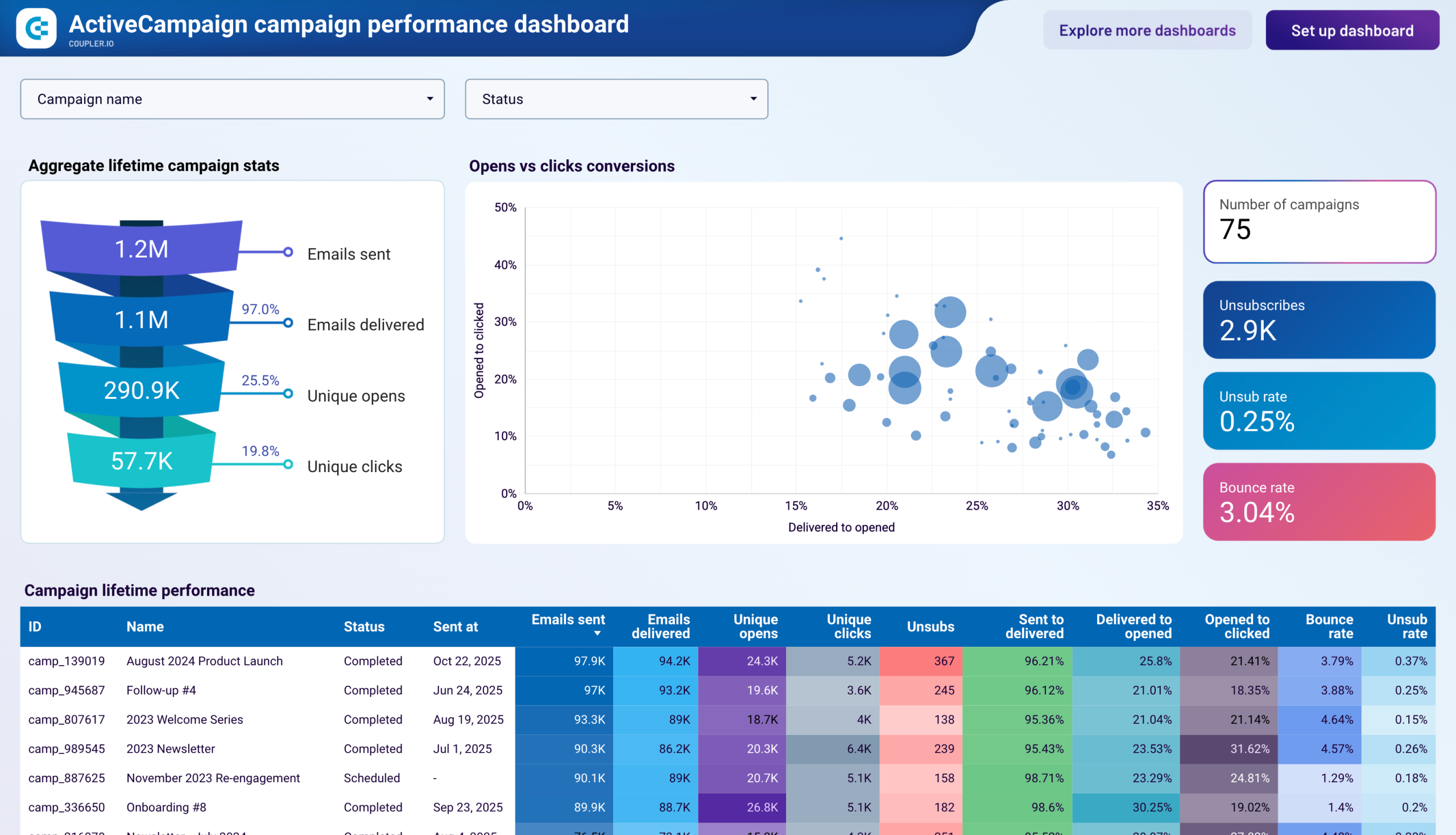
Quick start with dashboard templates
 +0
+0





 +0
+0




 +4
+4
about your case. It doesn't cost you a penny 😉
Talk to AI about your ActiveCampaign data
Examples of questions you can ask about ActiveCampaign data:
"Which email campaigns had the best engagement rates over the past three months and what do they have in common?"
"Show me how our deal pipeline has changed month over month and flag any stages where deals are getting stuck"
"What contact segments are growing fastest and which ones should we re-engage or clean up?"
"Compare form conversion rates across our landing pages and suggest which ones need attention"





Your data is secured by industry standards
 SOC 2 Type II
Certified
 Google Cloud
Certified
 GDPR
GDPRCompliant
 HIPAA
HIPAACompliant
Export data from ActiveCampaign to alternative destinations





