ActiveCampaign to Power BI

Export ActiveCampaign to Power BI

Build sophisticated marketing dashboards with advanced modeling capabilities. Connect ActiveCampaign to Power BI using Coupler.io to transform CRM and marketing automation data into interactive visualizations, enabling detailed performance analysis and strategic decision-making through powerful business intelligence tools.

πŸ† Voted 4.9/5 on Capterra πŸ”’ SOC2 & GDPR compliant 🌍 Trusted by 1M+ users worldwide

What data you can export from ActiveCampaign?

... and many more

All-in-one tool for ActiveCampaign data exports and analytics

Aggregate ActiveCampaign campaign metrics, contact data, and pipeline information with advertising platforms, web analytics, and business systems to create comprehensive Power BI datasets supporting advanced modeling and cross-functional business intelligence reporting.

Collect data from ActiveCampaign and enrich it with information from other sources image

Transform ActiveCampaign records into Power BI-optimized structures with proper relationships, hierarchies, and measures that enable sophisticated DAX calculations, complex filtering, and multi-dimensional analysis for business intelligence applications.

Organize raw ActiveCampaign data in the form of a ready-to-use data set image

Keep Power BI dashboards up-to-date with automated refresh cycles from monthly to 15-minute intervals. Ensure business intelligence reports and analytical models reflect the latest marketing performance without manual data updates or report regeneration.

Automate data refresh on a custom schedule image

Enhance Power BI analytics with Coupler.io AI integrations. Connect your ActiveCampaign datasets to AI tools for natural language exploration and strategic insights that complement your visual analytics with conversational intelligence.

Connect ActiveCampaign data to AI to query and analyze data using natural language conversations image
Collect data from ActiveCampaign and enrich it with information from other sources image
Organize raw ActiveCampaign data in the form of a ready-to-use data set image
Automate data refresh on a custom schedule image
Connect ActiveCampaign data to AI to query and analyze data using natural language conversations image

Why export ActiveCampaign to Power BI - real life cases

Business intelligence marketing dashboards icon

Business intelligence marketing dashboards

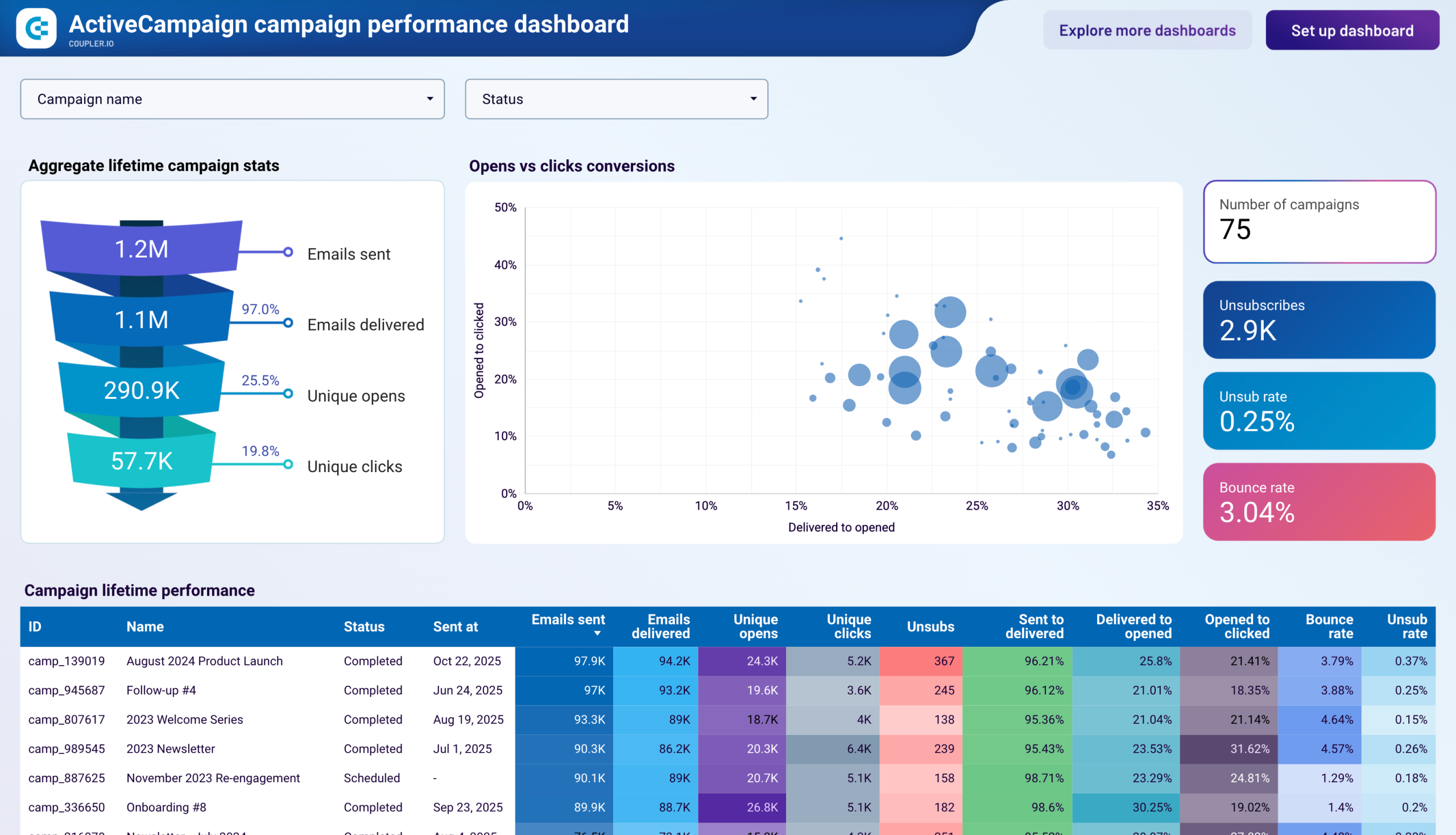
Build comprehensive Power BI dashboards combining ActiveCampaign campaign metrics with revenue data for complete marketing ROI visibility. Create interactive visualizations showing campaign effectiveness, lead generation trends, and pipeline contribution with drill-down capabilities across time periods, segments, and channels.
Multi-channel attribution analysis icon

Multi-channel attribution analysis

Integrate ActiveCampaign automation data with advertising platforms and web analytics in Power BI for sophisticated attribution modeling. Develop advanced visualizations showing how email campaigns, automation sequences, and other touchpoints contribute to conversion paths and revenue generation.
Customer lifecycle analytics icon

Customer lifecycle analytics

Create Power BI models combining ActiveCampaign engagement data with sales and customer success metrics for comprehensive lifecycle analysis. Build interactive dashboards tracking customer journey progression, identifying high-value segments, and predicting conversion likelihood through advanced analytics.
Marketing operations optimization icon

Marketing operations optimization

Develop Power BI dashboards aggregating ActiveCampaign automation performance, contact database health, and campaign efficiency metrics for operational insights. Enable marketing leaders to monitor team productivity, identify process bottlenecks, and optimize resource allocation through advanced modeling and data-driven analysis.

How to export ActiveCampaign to Power BI

Step 1. Connect to your ActiveCampaign account and select the data to export
time icon 30 seconds
Step 2. Organize data using transformation options such as filters, column management, aggregation, etc.
time icon 30 seconds
Step 3. Load data to Power BI following the in-app instructions
time icon 30 seconds
Step 4. Schedule data refresh to automate data flow from ActiveCampaign to Power BI
time icon 10 seconds

Automate data exports with the no-code ActiveCampaign Power BI integration

Quick start with dashboard templates

No such template is available yet.
No worries. Our team will create a template that fits your needs, just tell us more
about your case. It doesn't cost you a penny πŸ˜‰
Request a custom report

Talk to AI about your ActiveCampaign data

Power BI excels at visual analytics and business intelligence reporting, but sometimes you need immediate answers without building new reports or DAX measures. Coupler.io AI integrations complement your Power BI environment by connecting ActiveCampaign data to AI tools, enabling quick insights through natural language while maintaining your sophisticated visual analytics infrastructure.

Examples of questions you can ask about ActiveCampaign data:
"Build detailed comparisons of campaign performance across different customer segments and time periods"
"What are the most important metrics I should monitor for marketing automation effectiveness?"
"Create predictive models for contact engagement based on historical automation sequence performance"
"Analyze pipeline velocity patterns and identify which marketing activities accelerate deal progression"
connect-ai-integrations image activecampaign.svg

Customer success stories

At Coupler.io, our mission is simple: to help our customers succeed by unlocking the full potential of their data. Check out how using Coupler.io has helped businesses like yours scale and achieve better ROI.

Keep your data safe

Coupler.io safeguards your shared information and data transfers from breaches, leaks, and unauthorized disclosures.

Google Cloud Platform icon SOC2 icon Hipaa icon GDPR Compliance icon
Learn more about security

Ready to connect ActiveCampaign to Power BI and automate your reporting?