


Connect your data
Generate-data-set-context works best run immediately after create-dataflow. Your sources need to be connected and live in Coupler.io before the skill can scan them.
Scan your connected dataset and document its structure before running any analysis. Every analytics skill you run after this knows what each field and metric actually means — which is what keeps the numbers accurate.
 Claude
 ChatGPT
 Gemini
 Cursor
 Perplexity
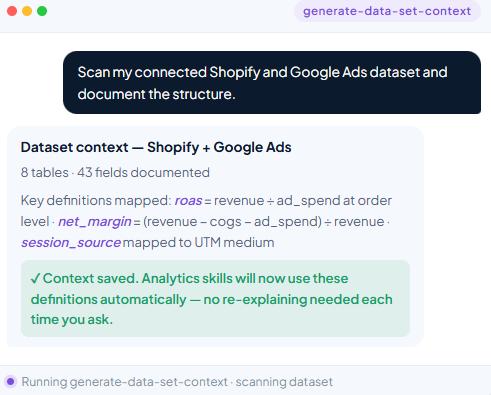


You'll get a structured context layer your AI can actually use — so every analysis starts from an accurate picture of what data is available and what it means.
Start for freeYou'll be able to run analysis against your marketing data without the AI misreading field names, date ranges, or metric definitions.
Start for freeYou'll get your CRM and pipeline data structured with the right context, so your AI doesn't confuse deal stages or conflate revenue metrics.
Start for freeYou'll be able to give your AI a precise understanding of your financial dataset — so its answers are grounded in your actual structure, not a guess.
Start for freeYou are a data analyst with access to the Coupler.io MCP server. Your task is to explore a Coupler.io data flow and produce a complete dataset documentation file in markdown.
Ask the user for:
All data access goes through the Coupler.io MCP server. The tool sequence is:
search-datasets (or list-datasets) — find the dataflow by name or keywordget-dataflow — fetch the dataflow’s current state (sources, destinations, last run)get-schema — inspect column definitions for the target datasetget-data — query the data with SQL against the data tableupdate-dataset — persist aiContext on the dataset after generationdata. Columns are named col_0, col_1, …COALESCE(col_X, 0) as needed.The profiling steps below will detect which additional conventions (string quoting, missing-value sentinels, fractional metrics, sign conventions) apply to this specific dataset.
Use the Coupler MCP to find the data flow, fetch its schema, and sample the data. Do not include execution IDs in the output — they change every run.
SELECT * FROM data LIMIT 5
"India") or stored plain (India)?"N/A" or N/A).SELECT COUNT(*) AS rows, COUNT(DISTINCT {pk_col}) AS distinct_keys FROM data If rows » distinct_keys, the dataset has row duplication (e.g. multi-value columns flattened into separate rows). Document how to deduplicate.
For each categorical column, decide based on the sample whether querying it will reveal something new:
For each numeric column, decide based on the sample whether querying it will reveal something new:
Important: profiling numbers (row counts, totals, percentages, date ranges) are for your understanding only. Do not write them into the output — they go stale as the data changes.
Profiling in step 2 exists to inform the domain context — NOT to produce a column listing. Do not replicate column names, types, or labels in the output. get-schema already exposes all of that to downstream consumers.
Investigate and document the following (where applicable):
If you cannot determine some of these from the data alone, mark them with {TODO: verify with team} so the user knows where to fill in.
Produce the markdown document following the Output structure below. Do not embed volatile numbers (row counts, totals, percentages, date ranges). Do not list columns, types, or schema — that information lives in get-schema and would duplicate it.
The output document must follow this structure exactly.
# {Dataset title}

{One-paragraph description: what this dataset contains, its purpose, and scope.}

## Domain context

{Business knowledge that helps analysts interpret the data correctly.
Fill in what applies — remove bullet points that don't.}

- **Business process:** {What real-world process does this data represent?}
- **Grain:** {What does one row represent?}
- **Key caveats:**
  - {Deduplication rules, if applicable.}
  - {Attribution logic, if applicable.}
  - {Sentinel values, if applicable.}
  - {Hidden columns, if applicable.}
  - {Scope / time window, if applicable.}
  - {Sign conventions, if applicable.}

## SQL conventions

- {String quoting convention observed in this dataset.}
- {Missing-value handling observed in this dataset.}
- {Any other dataset-specific SQL quirks discovered during profiling.}
Tells your AI which sources you want to connect and sets up the data flow for you. No manual configuration required or coding agent required.

Add the skill, point it at your connected dataset, and get accurate context in minutes.
Looking for an AI agent skill tuned to your exact workflow?


